Ready...
Set...
LAUNCH
It's time to craft your launch plan!
Your launch will set the tone for the energy your church feels when you announce the personalized dashboard. The effort and intentionality you invest in planning will directly influence how excited and involved your members are in exploring this new app experience. A well-executed launch creates momentum, sparking curiosity and encourages a deeper connection from day one.
Steps 1-3: Create your timeline, identify your supporting assets, and plan your stage announcement.
Step 4: Optimize the momentum from your launch; and, YES, we want to start thinking about your post-launch strategy now. Adoption is key, so don't skip this step!
Step 5: Answer the question that everyone wants to know, "How are we doing at engaging our members?" We'll guide you through measuring success!
Step 1 | Chart the Course
As you enter the final weeks of preparation for your launch weekend, a well-structured timeline will be essential in keeping you on track to meet your goals. It will help ensure accountability within your team, establish clear deadlines, and lay the foundation for a successful launch.
There are several key milestones you'll want to plan for as you lead up to your launch weekend. Below, we've outlined our recommended dates for each of the launch milestones based on your identified goal launch date.
NOW, TAKE ACTION:
- Confirm your launch date, staff & volunteer introduction dates
- Create your own printable launch timeline to share with your team
- Edit the Staff Introduction, Volunteer Introduction, and the Next Steps FAQs
- Review the Staff Introduction presentation deck
Launch Milestones
Testing and Review
4-5 weeks before launch
Suggested Date:
Launch Date Undetermined
Staff Introduction
2-3 weeks before launch
Suggested Date:
Launch Date Undetermined
Key Volunteer Introduction
1-2 weeks before launch
Suggested Date:
Launch Date Undetermined
Dashboard Live in Mobile App
5 days before launch
Suggested Date:
Launch Date Undetermined
Launch Weekend
All of your hard work and planning have led you to this day. Enjoy it!
Your Date:
This date is not yet determined
Step 2 | Set the Scene
Imagine this… It’s launch weekend. Church members arrive to balloons at the entrance and a striking new banner in the lobby that reads, “If it brings us closer to Jesus, it deserves our attention.” A nearby table stacked with donuts, accompanied by a playful sign — “Dashboards for Donuts”—sparks curiosity. Excitement fills the air… but what’s it all for?
What happens off-stage is just as vital as what’s said on stage. While you have only moments to make an impact from the stage, off-stage promotions—through incentives, value-driven interactions, and well-placed reminders—create lasting engagement.
NOW, TAKE ACTION:
- Select which off-stage assets you'll be using and send to your design team
- Decide whether you'll be offering an incentive to download the app
- Identify a Help Desk area where people can go to ask questions and get help
- Create the new journey for your mobile app that includes the dashboard
Asset Must Haves
-
Reiterate Your Why
The purpose isn't just decoration; it's your audience's motivation.
-
Clear and Simple
Confusion never converted anyone. Crystal clarity always wins.
-
Keep it in the App
Don't send members wandering – contain their journey within your world.
Step 3 | Take the Stage
The moment has arrived—the stage announcement. It’s time to captivate, inspire, and make a lasting impact. This is your Pastor’s opportunity to cast a powerful vision for the Church’s mission and guide each person on their discipleship journey.
Most importantly, this is your members' first introduction to the dashboard. Use this moment to emphasize the significance of the mobile app, showcase the value of personalized content, and demonstrate how it will enrich their connection with the church.
NOW, TAKE ACTION:
- Send the link to the sample videos to your pastor
- Help your speaking team script the announcement
- Create a specific message that ties into the weekend message
Find Resources
Not sure where to start? We have templates to get you started.
Step 4 | Keep the Momentum
Your job doesn’t end after launch weekend—in fact, the launch is just the beginning. Think of it as a season, not a single event. For the next 4-6 weeks, plan intentional moments to consistently drive people to the mobile app, encouraging them to engage with meaningful content and features.
Adoption doesn’t happen overnight; it’s an ongoing journey. As this new strategy becomes woven into your church’s culture, regular touchpoints, creative reminders, and purposeful engagement opportunities will help reinforce its value. The more consistently you highlight the app’s benefits, the more naturally it will become a vital part of your community’s experience.
NOW, TAKE ACTION:
- Create a strategy for regularly updating messages on the dashboard
- Identify early opportunities to introduce the mobile app like the first-time visitor class
- Establish routine check-ins with your ministry teams to ensure you have current event information
Step 5 | Measure the Impact

How do you know if you’ve met your goals?
Tracking progress might seem overwhelming, but don’t worry—we’ve made it simple. Metrics provide clarity, showing what’s working and where adjustments may be needed. Whether it’s app downloads, engagement rates, or participation in key features, these numbers tell the story of your launch’s impact.
Instead of seeing data as intimidating, think of it as a tool to celebrate wins and refine your strategy. With easy-to-follow insights, you’ll have a clear picture of success and a roadmap for continued growth.
NOW, TAKE ACTION:
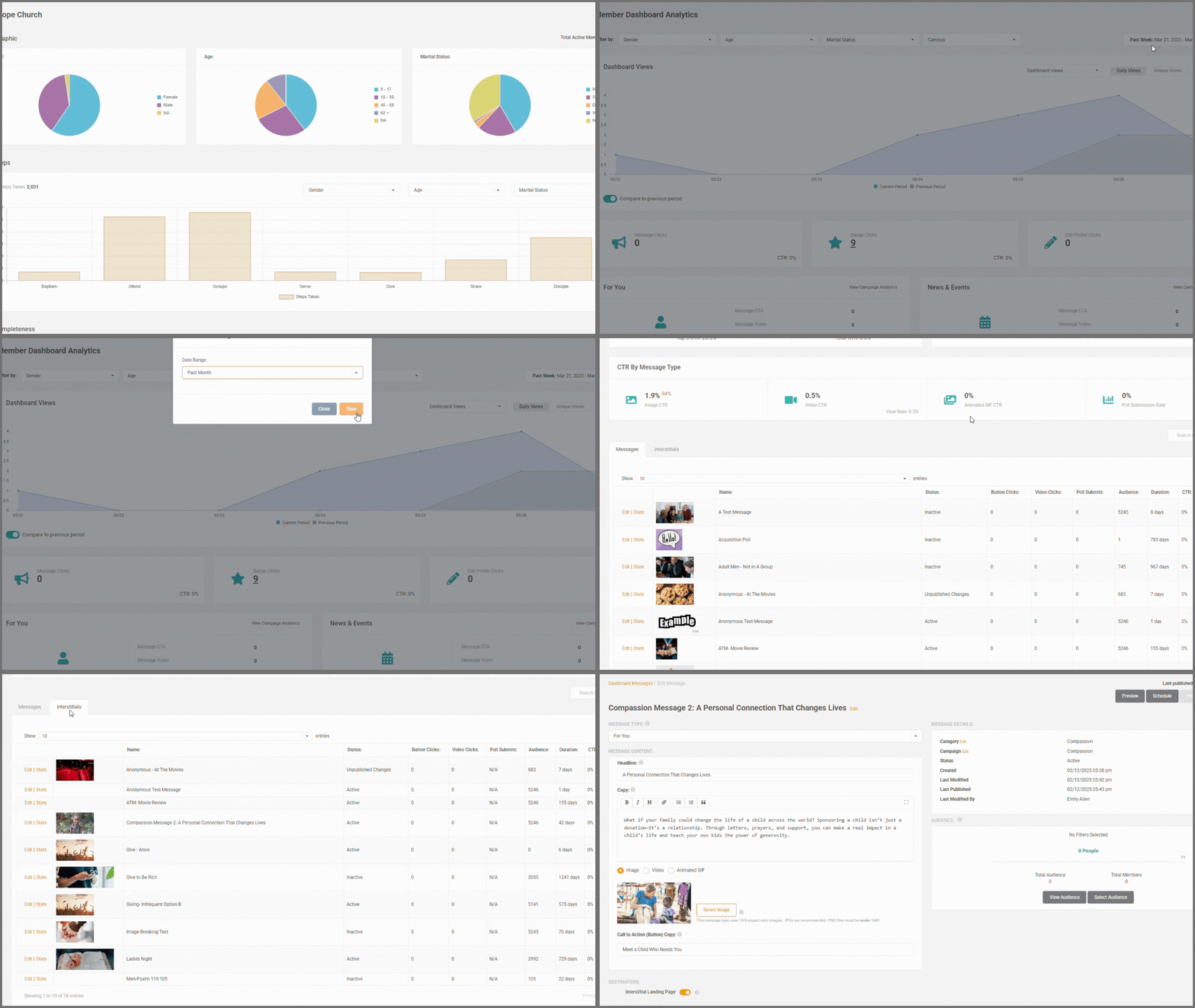
- Familiarize yourself with the dashboard analytics
- Set up your affiliation types to hone your analytics
- Set badge goals and start measuring!
-1.png?width=300&height=58&name=ChurchIQ_Logo_(Teal-Gray)-1.png)
Your Insights Are Waiting
You’ve only scratched the surface in what you’re able to do with your data. Turn numbers into insights by checking out ChurchIQ.
Hold On
Looks like you haven't submitted your launch plan yet.
Take time to think through what you want the day of to look like. Once you submit your launch plan, we'll prompt you to schedule a touchbase with .
.png?width=210&height=55&name=StudioC-logo-GRAY_(250px).png)

-1.png?width=63&height=63&name=image%20(2)-1.png)
-1.png?width=63&height=63&name=image%20(1)-1.png)